
Enterprise DNS security: stop threats at the first DNS query
The GCC's first hybrid DNS firewall — and an Infoblox and Cisco Umbrella alternative. Run it cloud-delivered across 52 global data centres, or on-premises with local AI, filtering and enforcement. AI threat detection and RPZ feed export stop threats before packets reach your firewall — from a DNS platform that also runs your authoritative DNS.
On-premises: AI, filtering and enforcement run inside your own data centre — queries and logs never leave it.
- Cached response, on-premises
- <1ms
- Local Resolver, local mode
- Cached response, cloud
- <100ms
- Global anycast edge
- Resolution uptime
- 99.99%
- Platform SLA
- Active threat indicators
- 20M+
- Continuously updated
- Dubai DET Licence No. 1357380
- Regional data residency by design
- Multi-tenant for MSPs and group subsidiaries
Book your free demo
See DNS Armor™ live on your own environment. 30 minutes with a solutions architect — no credit card, no obligation.
See the DNS firewall at work
Real screens from the DNS Armor™ admin portal — not mockups.
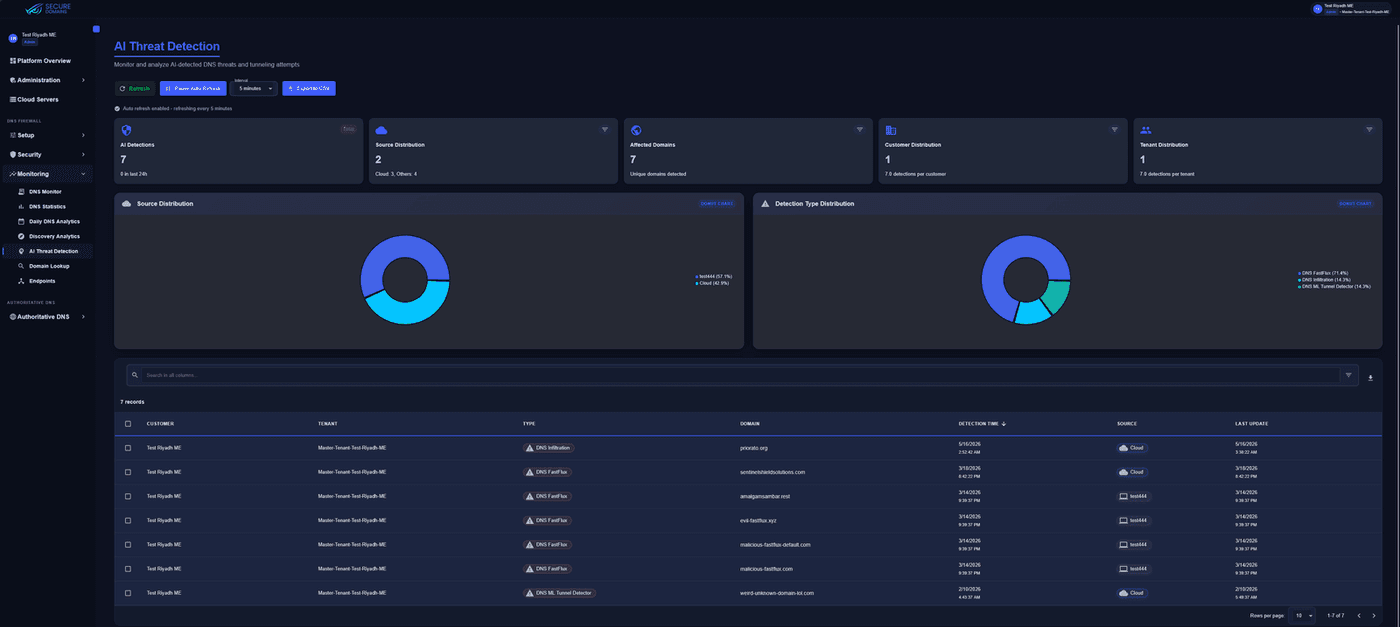
Tunnelling caught in the act
DNS Infiltration, FastFlux and ML Tunnel Detector findings per customer and tenant, with detection-type distribution and CSV export for your SOC.
Built for the frameworks your auditor actually uses
GCC regulators have moved from broad principles to specific technical controls, and a large share of that control surface runs through DNS. Here is where the resolution layer earns you credit.
Authority
UAE Cyber Security Council
Current version
Information Assurance Standard V2
Applies to
Entities operating critical information infrastructure in the UAE. Six management and nine technical control domains.
What the framework asks at the DNS layer
What DNS Armor™ gives you to evidence it
- T4.5
Network Security Management — implementation guidance names ingress and egress filtering to permit only documented ports and protocols, and restricting access to trusted sites.
Web, application and content filtering by category, with Cloud Policies that activate on a schedule and Local Rulesets for explicit allow and block decisions.
Protect - T3
Operations Management — protection against malware and unauthorised software, and monitoring of system operations to detect and prevent incidents.
AI and behavioural detection of tunnelling, exfiltration and DGA activity, with DNS Monitor, Daily DNS Analytics and Discovery Analytics feeding your SOC.
Protect
52 data centres. You choose which ones serve you.
DNS query processing and log archival take place within the geographic region assigned to your organisation — and do not leave it for processing or storage.

- 0
- Data centres
- 0
- Countries
- 0
- Global regions
Coverage by region
Your assigned region is a deployment choice, not a contractual promise — pin to the UAE alone, the GCC, the EU, or any combination you need.
Built for security operations centres
Purpose-built for zero-trust operations, banking compliance cells and distributed enterprise fleets.
AI threat detection
Advanced ML and behavioural analysis at the DNS layer
- Detects DNS tunnelling and data exfiltration attempts
- Surfaces covert channels that never match a signature
- Findings land in AI Threat Detection under Monitoring
Threat feeds and external RPZ
Bidirectional Response Policy Zones
- Built-in threat intelligence, web filtering and application feeds
- Ingest external RPZ feeds over HTTPS on a sync schedule
- Export your feeds in RPZ format to BIND, Infoblox and third-party resolvers
Cloud Policies and scheduling
Time-aware security posture
- Activate policies on a schedule for daytime and after-hours postures
- Local Rulesets for explicit allow and block decisions
- Bypass Domains keep split-horizon internal resolution working
Networks and mapping
Granular enforcement by address
- Correlates public and private network addressing schemes
- External and private network scopes per tenant
- Precise policy enforcement down to a subnet
Endpoint Agent
Windows, macOS and Linux
- Consistent policy for roaming and off-network devices
- Split-tunnel detection keeps policy applied over VPN
- Silent install with API-key bootstrap for fleet rollout
Local Resolver appliance
Proxy mode or full local mode
- Runs on ESXi, Hyper-V or KVM with high availability
- Local mode resolves on-appliance with AI, feeds and local rulesets
- Active Directory connector maps queries to authenticated users
Native SIEM and SOC streaming
Three CEF streams from the Local Resolver Logs Connector — DNS firewall events, query logs and portal audit logs.
- DNS firewall (RPZ) events
- DNS query logs
- Portal audit logs
Ingests CEF natively — point the collector at facility local4 and the parser keys on the Secure Domains | Logs Connector vendor pair.
Sample record
<166> Aug 5 00:14:07 secure-domains-local-resolver dns-rpz: CEF:0|Secure Domains|Logs Connector|1.0.0|1001|DNS RPZ|7|rt=… dhost=… src=… cs4Label=TenantName cs4=…- ArcSight, Microsoft Sentinel and Elastic ingest CEF natively. Onboarding templates ship for Splunk and QRadar.
- Facility local4 by default — point any collector-side facility filter at local4.
- Prefer TCP, TLS or RELP. RPZ records run around 650 bytes and can exceed the practical limit for syslog over UDP, where truncation is silent.
Roll out across the estate in an afternoon
Works alongside your existing firewall
A different control point, not a replacement
Your next-generation firewall protects the traffic that passes through it. DNS Armor™ Protect works at the moment a name is looked up — which happens before any connection is attempted, and happens the same way whether the device is in the office, at home or travelling.
- Blocks the lookup, so the connection is never made
- Catches slow, sophisticated DNS tunnelling perimeter firewalls were never built to detect
- Covers roaming and off-network devices your firewall never sees
- No hardware, and no changes to your network routing
Intune, GPO, SCCM and more
Silent install with API-key bootstrap
Deploy the Endpoint Agent through Microsoft Intune, Jamf or Workspace ONE, Active Directory Group Policy, or SCCM, Ansible, Puppet and Chef.
DNS-Armor-Setup.exe /S /API=<api-code>Or place an API-code.txt file beside the installer. Registered agents appear under Monitoring → Endpoints.
DNS Armor™ Protect vs. perimeter firewalls and other DNS platforms
Where each control sits, and why DNS filtering adds a layer your perimeter firewall cannot cover on its own.
Inspection layer
DNS Armor™ Protect
The DNS lookup itself, before a connection is attempted
Stops the threat at the lookup, and covers devices off the network too
Perimeter firewalls (NGFW)
Traffic passing through the firewall, at the network edge
Other DNS security platforms
DNS layer, varies by vendor
Policy scheduling
DNS Armor™ Protect
Time-based Cloud Policy activation
Switch daytime and after-hours postures without re-compiling rules
Perimeter firewalls (NGFW)
Static rules requiring change windows
Other DNS security platforms
Rarely supported
AI threat detection
DNS Armor™ Protect
ML and behavioural analysis of tunnelling and exfiltration
Finds covert channels that never appear on a blocklist
Perimeter firewalls (NGFW)
Not designed for sophisticated DNS tunnelling — DNS controls rely largely on known-bad lists
Other DNS security platforms
Signature and reputation lists only
Network mapping
DNS Armor™ Protect
Correlates public and private addressing schemes
Granular enforcement and visibility down to a subnet
Perimeter firewalls (NGFW)
Requires span ports or TAP aggregators
Other DNS security platforms
Limited internal visibility
Data sovereignty
DNS Armor™ Protect
Query processing and log archival in your assigned region
Residency is architectural, not a contractual promise
Perimeter firewalls (NGFW)
On-premises, but no cloud telemetry control
Other DNS security platforms
Telemetry commonly routed via US or EU clusters
Multi-tenancy
DNS Armor™ Protect
Multi-tier tenancy with delegated RBAC
Segregated audit trails per tenant or subsidiary
Perimeter firewalls (NGFW)
Single management plane
Other DNS security platforms
Often single-tenant
RPZ interoperability
DNS Armor™ Protect
Ingest external feeds and export your own
Keeps existing BIND, Infoblox and SOC stacks in play
Perimeter firewalls (NGFW)
Not applicable
Other DNS security platforms
Third-party connectors or manual lists
Deployment model
DNS Armor™ Protect
Cloud delivered, or cloud managed on-premises
One platform covers cloud and on-premises estates
Perimeter firewalls (NGFW)
Appliance-bound
Other DNS security platforms
Usually cloud only
What security teams tell us
From regional financial institutions, government entities and managed service providers.
“DNS Armor™ has transformed our security posture. We've seen a 70% reduction in security incidents since implementation, and the data sovereignty controls make compliance a breeze.”
“As an MSP, the multi-tenancy capabilities in DNS Armor™ allow us to efficiently manage security for all our clients from a single dashboard while maintaining complete separation of data.”
“The AI-driven threat detection caught sophisticated attacks that our previous solutions missed. DNS Armor™'s ability to detect DNS tunneling has been particularly impressive.”
Technical and compliance questions
Perimeter coexistence, residency, SIEM streaming and deployment.
No — it works alongside them, and it is not trying to do their job. Your firewall protects the traffic that flows through it. DNS Armor™ Protect works one step earlier, at the moment a device looks up a web address, and blocks the dangerous ones before any connection is attempted. It also covers laptops and phones when they are away from the office and never touch your firewall at all. No new hardware, and no changes to your network. Firewalls were also never designed to catch sophisticated DNS tunnelling, where data is drip-fed out inside ordinary-looking lookups over hours or days to stay under the radar. That is exactly the behaviour our models are built to spot.
In the region you choose. Your DNS traffic is processed there and your logs are stored there, and personal data does not leave it. Logs are kept for the period in your contract — usually 30, 60 or 90 days. Every customer sits in a separate, isolated space, and we never combine or compare data between customers.
Yes, using the tools you already have — Microsoft Intune, Jamf, Workspace ONE, Windows Group Policy, SCCM, Ansible, Puppet or Chef. The install runs with no prompts and no user involvement: DNS-Armor-Setup.exe /S /API=<api-code>, or drop an API-code.txt file next to the installer. Add /PATH if you want a custom location. Devices appear under Monitoring → Endpoints as they register and pick up your policy automatically.
The on-premises appliance sends three separate streams to your SIEM — firewall events, DNS query logs and portal audit logs. They use CEF, a common security-log format, so Microsoft Sentinel, ArcSight and Elastic read them as they are, and we provide ready-made setup templates for Splunk and QRadar. Send them over TCP, encrypted TLS (port 6514) or RELP rather than plain UDP — longer records can be cut short over UDP without any warning, and a cut-short record will not load.
By watching behaviour rather than checking names against a list. Machine-learning models look at how your DNS traffic actually behaves and flag the patterns that give an attacker away: data being smuggled out inside DNS lookups, malware quietly checking in with its operator, and the throwaway domain names malware generates to avoid being blocked. None of those appear on any blocklist. Each detection carries a confidence score, and your team can approve or reject it to sharpen future results. They appear under Monitoring → AI Threat Detection.
Yes, and it works in both directions. You can pull your existing feeds in over HTTPS, refreshed anywhere from hourly to manually, with sign-in details, timeouts and retries if they are needed. You can also publish DNS Armor™'s own threat, web-filtering and application lists in RPZ — the standard format for sharing them — so your existing DNS servers and security tools can use them.
Yes. The Local Resolver is a virtual machine that runs on VMware ESXi, Hyper-V or KVM. It can either pass queries to our cloud over an encrypted connection, or handle everything itself — filtering, AI detection and your own rules — so queries never leave your premises. Running locally, cached answers come back in under a millisecond. It also supports high availability, time synchronisation, and an Active Directory link so you can see which user made which request.
Through nine roles. A Security Operator can change security policies, rules, exceptions, devices and networks; a Security Analyst sees exactly the same things but cannot change anything. Each person can hold at most one security role, one licensing role and one DNS role, and the system blocks any combination that would undermine separation of duties. Every change is written to an audit log.
Sovereign residency, in-region logging and encrypted transport
DNS query processing and log archival take place within the geographic region assigned to your organisation — data does not leave that region for processing or storage. Channels are end-to-end encrypted, data at rest is encrypted with customer-isolated key scope, and tenants are held in logically isolated containers. Secure Domains acts as data processor under a Data Processing Addendum, with your organisation as controller.
- Query processing and log archival stay in your assigned region
- Query log retention per contracted period — typically 30, 60 or 90 days
- Customer data is never sold, rented or shared for marketing
- No correlation, mining or aggregation across customer organisations