AI threat detection
Machine-learning and behavioural models find DNS tunnelling, data exfiltration and DGA activity that never match a blocklist.
Measured on our own platform, run from the region you choose.
Twelve capabilities, grouped by the job they do. No add-on modules to unlock.
Machine-learning and behavioural models find DNS tunnelling, data exfiltration and DGA activity that never match a blocklist.
Continuously updated threat intelligence, web-filtering categories and application identification.
Answers are validated so spoofed and cache-poisoned responses are rejected.
Cloud Policies switch on and off by time, for daytime and after-hours postures, with Local Rulesets for explicit allow and block.
Public and private addressing are correlated per tenant, so policy can be enforced down to a subnet.
DNS over HTTPS and DNS over TLS protect queries from eavesdropping and tampering.
Runs on ESXi, Hyper-V or KVM in proxy mode or full local mode, with high availability and an Active Directory connector.
Windows, macOS and Linux agent keeps policy on roaming devices, including over VPN split tunnels.
Multi-tier tenants with delegated administration and a separate audit trail for every tenant.
Dashboards for queries, firewall hits, discovered apps and countries, with CSV export for audits.
Query and security logs are archived in the region you choose, for the retention period in your contract.
Ingest external RPZ feeds and export DNS Armor™ feeds to BIND, Infoblox and other resolvers.
Each threat below still needs a DNS answer. Protect refuses to give one.
Known distribution and command-and-control domains are refused at lookup, from continuously updated threat feeds.
Droppers and the command channels ransomware needs are blocked before any payload can be fetched or keys exchanged.
Threat intelligence and category filtering stop lookups of credential-harvesting and look-alike domains.
Behavioural models flag data encoded into query patterns, with a confidence score your team can confirm or reject.
Newly observed and algorithmically generated (DGA) domains are classified and held back by policy.
Real screens from the DNS Armor™ admin portal, not mockups.
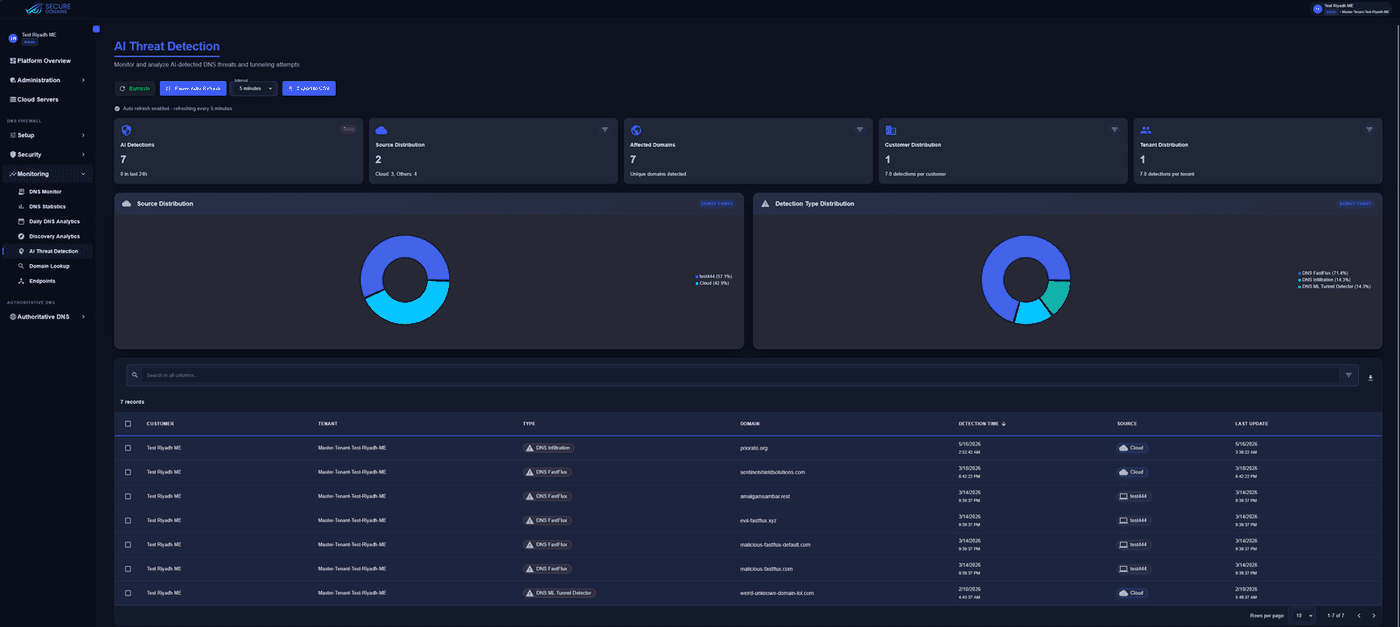
DNS infiltration, fast-flux and ML tunnel-detector findings per customer and tenant, with detection-type distribution and CSV export for your SOC.
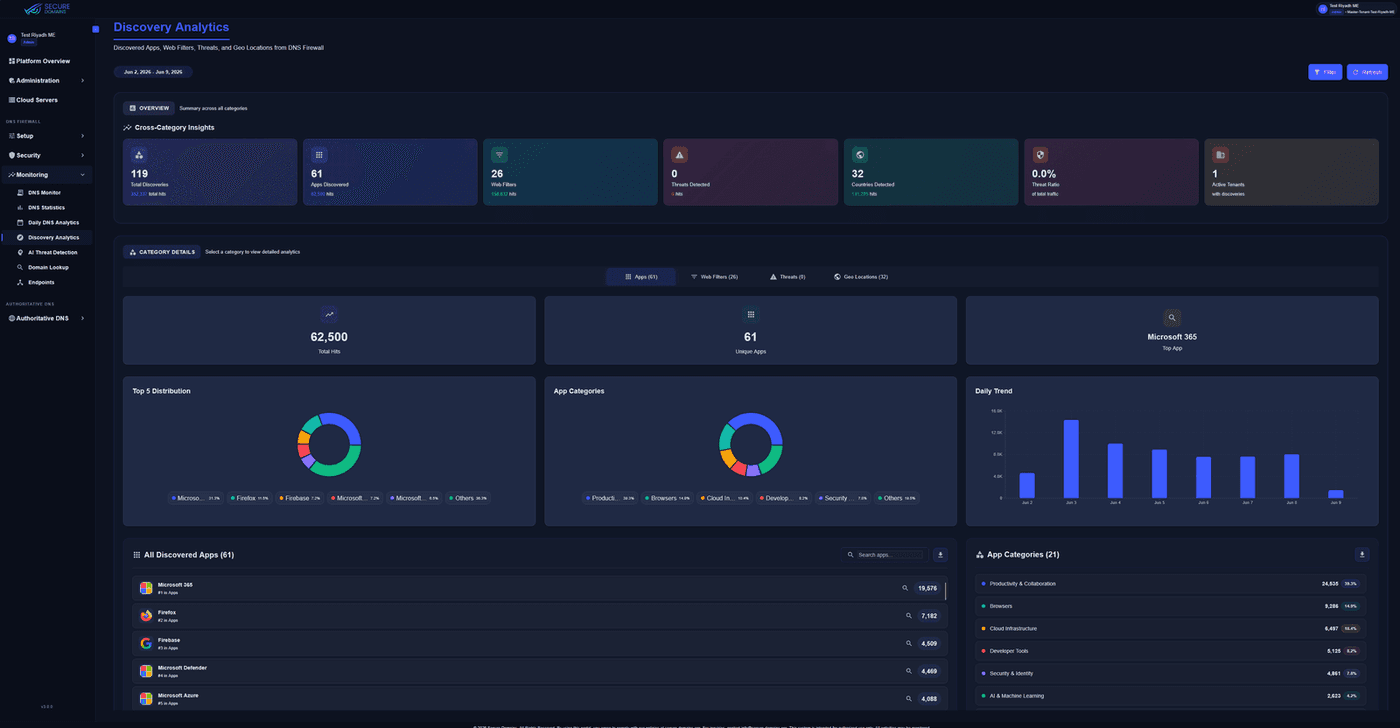
Applications, web-filter categories, threats and countries discovered from live DNS traffic, including apps nobody told you were in use.
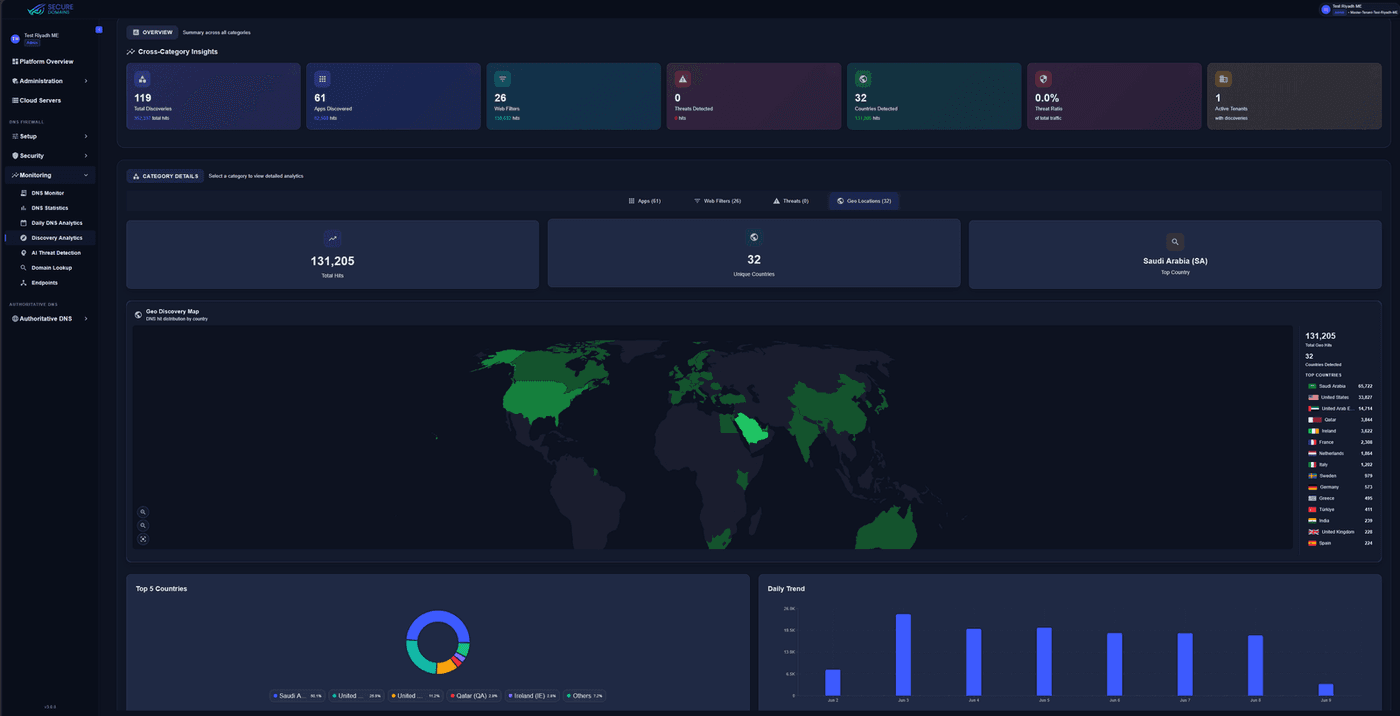
A country-level map of DNS hits with the full ranking beside it, so you can see at a glance whether traffic leaves the region you expected.
Threat intelligence and RPZ feeds
ML behaviour analysis
Your categories, schedules and rules
Safe names resolve normally. Dangerous ones get no answer, so the connection never starts.
The Local Resolver Logs Connector sends three CEF streams: DNS firewall events, query logs and portal audit logs.
Native CEF ingestion in ArcSight, Microsoft Sentinel and Elastic; onboarding templates for Splunk and QRadar.
Streams
Supported SIEMs
Deploy the Endpoint Agent silently through your management platform, point networks at DNS Armor™, or run the Local Resolver on-premises.
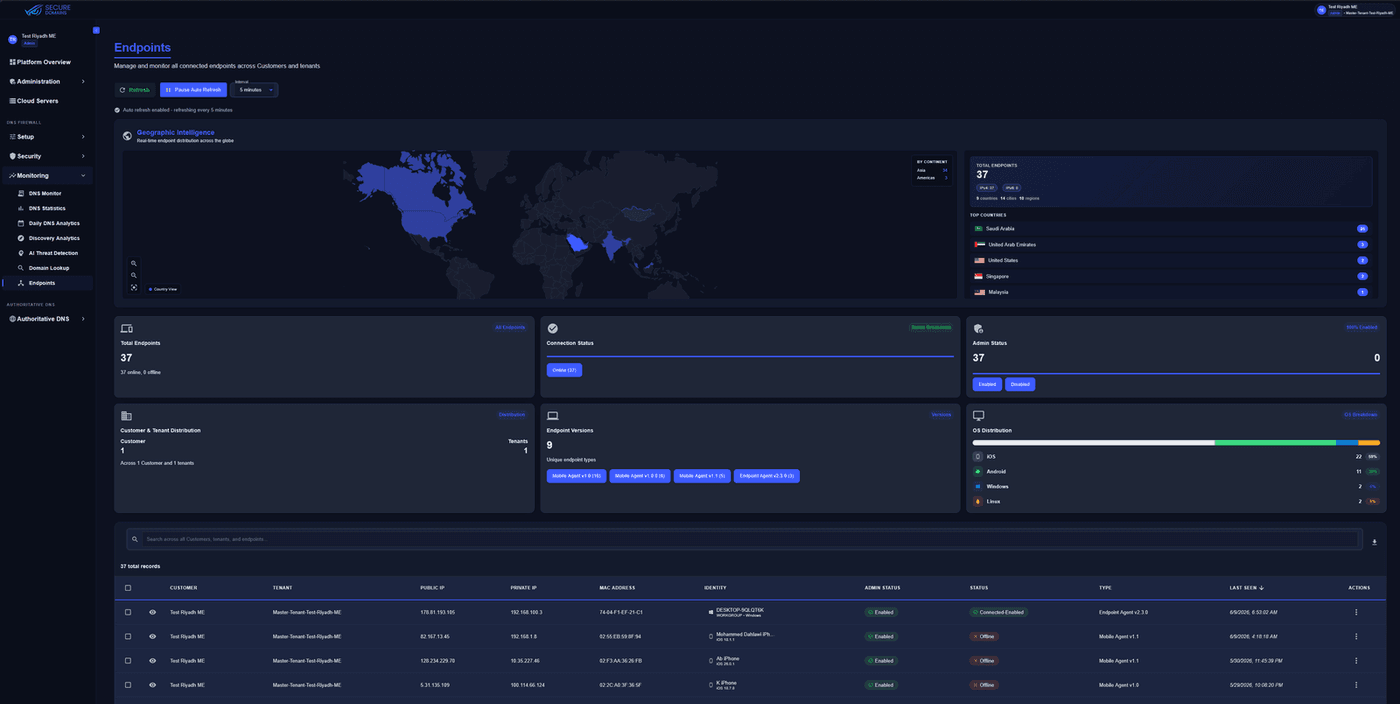
Registered agents appear under Monitoring → Endpoints and pick up policy automatically.
Deployment tools
Your next-generation firewall protects the traffic that passes through it. Protect works at the moment a name is looked up, before any connection is attempted, wherever the device is.
Protect maps to specific DNS-layer controls in each of these frameworks.
Categories, not vendors.
| Capability | DNS Armor Protect™ | Firewalls (NGFW) | Other DNS security |
|---|---|---|---|
| Blocks before a connection is made | Yes | Partial | Yes |
| Covers roaming devices | Yes | Partial | Varies |
| ML tunnelling and exfiltration detection | Yes | Partial | Partial |
| Per-subnet public and private mapping | Yes | N/A | No |
| Queries and logs in your chosen region | Yes | Varies | No |
| Multi-tenant, delegated admin | Yes | Partial | Varies |
| RPZ import and export | Yes | No | Varies |
| Cloud and on-premises, one platform | Yes | Partial | Varies |
No — it works alongside them, and it is not trying to do their job. Your firewall protects the traffic that flows through it. DNS Armor Protect™ works one step earlier, at the moment a device looks up a web address, and blocks the dangerous ones before any connection is attempted. It also covers laptops and phones when they are away from the office and never touch your firewall at all. No new hardware, and no changes to your network. Firewalls were also never designed to catch sophisticated DNS tunnelling, where data is drip-fed out inside ordinary-looking lookups over hours or days to stay under the radar. That is exactly the behaviour our models are built to spot.
In the region you choose. Self-service accounts are served from our Frankfurt, Germany service plane, and DNS logs are archived in the region you pick at signup. On the Enterprise track, the service plane and logging plane sit together in the region you choose. Logs are kept for the period in your contract, usually 30, 60 or 90 days. Every customer is held in an isolated tenant, and we never combine or compare data between customers.
Yes, using the tools you already have — Microsoft Intune, Jamf, Workspace ONE, Windows Group Policy, SCCM, Ansible, Puppet or Chef. The install runs silently, with no prompts and no user involvement. Devices appear under Monitoring → Endpoints as they register and pick up your policy automatically.
The on-premises appliance sends three separate streams to your SIEM — firewall events, DNS query logs and portal audit logs. They use CEF, a common security-log format, so Microsoft Sentinel, ArcSight and Elastic read them as they are, and we provide ready-made setup templates for Splunk and QRadar. Send them over TCP, encrypted TLS (port 6514) or RELP rather than plain UDP — longer records can be cut short over UDP without any warning, and a cut-short record will not load.
By watching behaviour rather than checking names against a list. Machine-learning models look at how your DNS traffic actually behaves and flag the patterns that give an attacker away: data being smuggled out inside DNS lookups, malware quietly checking in with its operator, and the throwaway domain names malware generates to avoid being blocked. None of those appear on any blocklist. Each detection carries a confidence score, and your team can approve or reject it to sharpen future results. They appear under Monitoring → AI Threat Detection.
Yes, and it works in both directions. You can pull your existing feeds in over HTTPS, refreshed anywhere from hourly to manually, with sign-in details, timeouts and retries if they are needed. You can also publish DNS Armor™'s own threat, web-filtering and application lists in RPZ — the standard format for sharing them — so your existing DNS servers and security tools can use them.
Yes. The Local Resolver is a virtual machine that runs on VMware ESXi, Hyper-V or KVM. It can either pass queries to our cloud over an encrypted connection, or handle everything itself — filtering, AI detection and your own rules — so queries never leave your premises. Running locally, cached answers come back in under a millisecond. It also supports high availability, time synchronisation, and an Active Directory link so you can see which user made which request.
Through nine roles. A Security Operator can change security policies, rules, exceptions, devices and networks; a Security Analyst sees exactly the same things but cannot change anything. Each person can hold at most one security role, one licensing role and one DNS role, and the system blocks any combination that would undermine separation of duties. Every change is written to an audit log.
Book a 30-minute walkthrough with a solutions engineer, or start a free self-service trial today.
